How to Split a PDF with ModernPDF
ModernPDF is a browser-based PDF toolkit that processes files locally on your device using WebAssembly. Unlike other online tools, your PDF is never uploaded to a server — it stays on your computer the entire time. That makes it a safe option for splitting contracts, financial documents, medical records, or anything else you'd rather not send over the internet.
Open the Split PDF tool
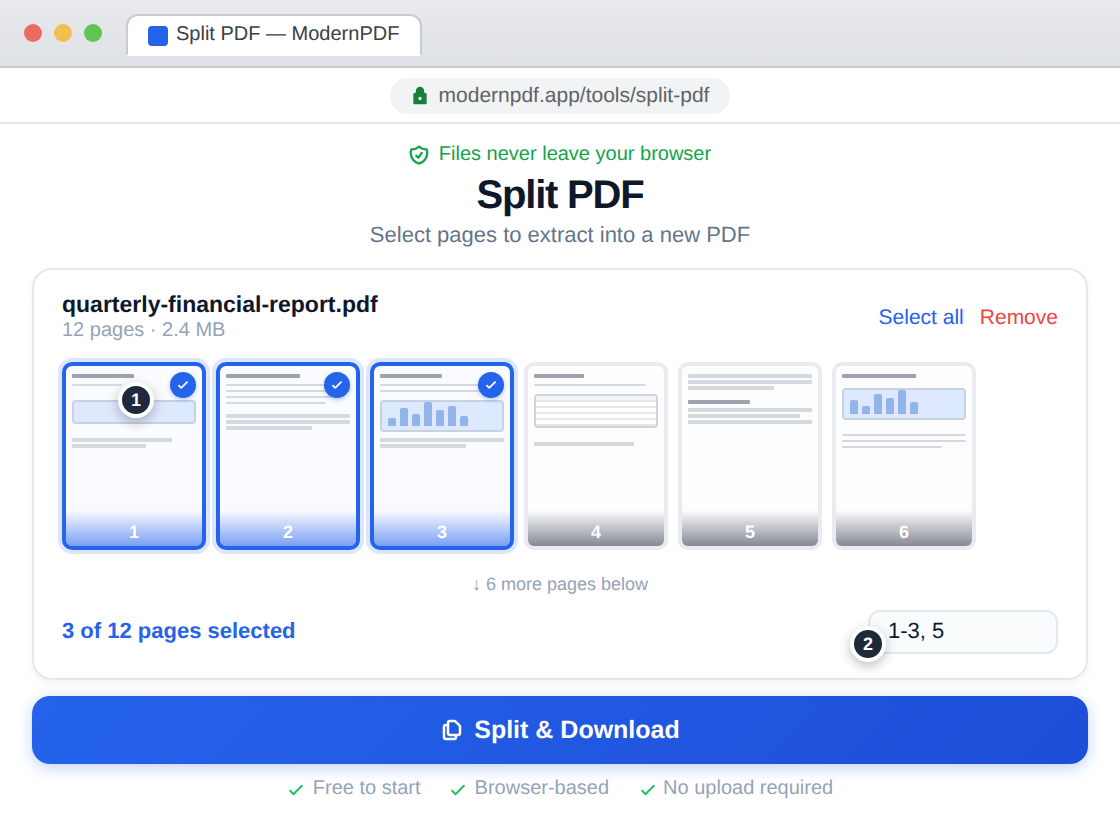
Go to the Split PDF tool and drag your file into the drop zone, or click to browse your files. Your PDF renders instantly in the browser — nothing is uploaded anywhere.
Choose how to split
You have three options. Extract specific pages by entering numbers like 1, 3, 7. Define ranges like 1-5, 6-10 to create separate files for each section. Or split every N pages for batch processing. You can preview every page before splitting to make sure you're grabbing the right ones.
Download your files
Click the split button and your separated PDFs are ready immediately. Download each file individually or grab them all at once. The originals are untouched.
Why Split a PDF?
There are many practical reasons to separate a PDF into smaller files. Some of the most common situations include:
Sharing part of a document without exposing everything. If you have a 40-page contract and only need to send the signature page to a colleague, splitting lets you extract just that page. This is especially important for legal documents, HR paperwork, and financial statements where unnecessary disclosure creates risk.
Extracting a chapter or section from a report. Analysts, students, and researchers often work with long PDFs — textbooks, annual reports, government publications. Splitting lets you pull the relevant section into its own file for annotation, reference, or sharing.
Separating individual forms from a batch. Many organizations scan or generate PDFs that contain multiple forms, invoices, or certificates in a single file. Splitting by page turns a 200-page batch into 200 individual files for distribution or filing.
Reducing file size for email. Email providers typically limit attachments to 10–25 MB. A large PDF can be split into smaller sections that stay within the limit. After splitting, you may also want to compress each file further.
Removing sensitive pages before sharing. Instead of redacting, sometimes it's simpler to split out the pages you need and leave the sensitive ones behind entirely. For more targeted privacy, see our guide on how to redact a PDF.
Split Methods Explained
Extract specific pages
Enter comma-separated page numbers like 1, 3, 7, 12 and each page becomes its own PDF. This is the fastest method when you know exactly which pages you need — a cover sheet, a particular table, a single form, or a signature page.
Split by range
Define ranges like 1-10, 11-20, 21-30 and each range becomes a separate file. This is ideal for dividing a document into logical sections — chapters of a book, sections of a manual, or quarterly breakdowns in a financial report. Ranges can overlap, and you can mix ranges with individual pages: 1-5, 8, 12-15.
Split every N pages
Choose a number and the PDF is divided into equal chunks. Split every 1 page and a 100-page PDF becomes 100 individual files. Split every 10 pages and it becomes 10 files of 10 pages each. This is the most efficient method for batch processing identical forms, certificates, or invoices.
How to Split a PDF on Mac (Using Preview)
Every Mac includes Preview, a built-in app that can handle basic PDF splitting without any additional software. Here's how:
Open your PDF in Preview — it's the default PDF viewer, so double-clicking the file usually works. In the sidebar, you'll see thumbnail previews of each page. If the sidebar isn't visible, go to View > Thumbnails.
To extract specific pages, hold the Command key and click the thumbnails of the pages you want. Then drag the selected thumbnails from the sidebar onto your desktop or into a Finder folder. Preview creates a new PDF containing just those pages.
To split a range, click the first page in the range, hold Shift, and click the last page. Then drag the selection out.
Preview works well for occasional, small-scale splits. It becomes tedious for anything more than a handful of pages, and it can't do automated splitting (every N pages) or handle multiple ranges at once. For those tasks, a dedicated tool like ModernPDF's split tool is faster.
How to Split a PDF in Chrome (Print to PDF)
Any browser can split a PDF using the print dialog — no software required.
Open your PDF in Chrome (drag the file into a browser tab, or right-click the file and choose Open With > Chrome). Press Ctrl+P (Windows) or Cmd+P (Mac) to open the print dialog.
Change the Destination to "Save as PDF." Under Pages, select "Custom" and enter the pages you want — for example, 3-7 to extract pages 3 through 7. Click Save, name your file, and you have a new PDF with just those pages.
This method works on any operating system and doesn't require an internet connection. The downsides: you can only extract one range at a time, and you'll need to repeat the process for each split. There's no batch processing or preview of individual pages.
How to Split a PDF Without Adobe Acrobat
Adobe Acrobat Pro's "Organize Pages" feature is the traditional way to split PDFs. You open a file, go to Tools > Organize Pages > Split, and choose to split by page count, file size, or bookmarks. It's powerful but it starts at $22.99/month.
You don't need Acrobat. Here's how the alternatives compare:
| Method | Cost | File Privacy | Batch Split | Works Offline |
|---|---|---|---|---|
| ModernPDF | Free (3/day) | Never uploaded | Yes | Yes |
| Adobe Acrobat | $22.99/mo | Local (desktop app) | Yes | Yes |
| Smallpdf | Free (limited) / $12/mo | Uploaded to server | Yes | No |
| iLovePDF | Free (limited) / $9/mo | Uploaded to server | Yes | No |
| Mac Preview | Free (built-in) | Local | No | Yes |
| Chrome Print | Free | Local | No | Yes |
The key difference between browser-based tools is what happens to your file. With Smallpdf and iLovePDF, your PDF is uploaded to their servers for processing and deleted afterward. With ModernPDF, the file never leaves your browser — all processing happens locally using WebAssembly. If you work with contracts, financial data, medical records, or anything confidential, this is a meaningful distinction. Read more about how our zero-upload architecture works.
Tips for Splitting Large PDFs
Preview before you split. Scan the page thumbnails to confirm you're extracting the right pages. Page numbers in the PDF's content don't always match the actual page position in the file — a document might start numbering from page 1 on what is actually the third page of the file.
Use ranges for structured documents. If a report has a clear table of contents with page numbers, use those ranges directly. Entering 1-12, 13-28, 29-45 is faster than extracting pages one at a time.
Combine splitting with other tools. After splitting, you might want to merge specific pages from different documents, compress the results for email, or rotate pages that were scanned sideways.
Check the output file size. Each split file contains its own copy of embedded fonts and metadata. A 10-page PDF with custom fonts may produce 10 individual files that each include those fonts, making the total size of all split files larger than the original. This is normal behavior for all PDF split tools.
Frequently Asked Questions
Yes. Enter exact page numbers or ranges like 1-3, 5, 8-12 and each range becomes its own PDF file. You can preview every page before splitting to make sure you're selecting the right ones.
No. Splitting separates existing pages into new files without any recompression or quality loss. Text, images, and vector graphics remain identical to the original. The output files are byte-for-byte the same quality as the corresponding pages in the source document.
It depends on the tool. Most online PDF splitters upload your file to their servers for processing. ModernPDF is different — splitting happens entirely in your browser using WebAssembly. Your PDF is never uploaded to any server, which makes it safe for contracts, financial statements, medical records, and any other confidential documents. Learn more about our security architecture.
If the PDF requires a password to open, you'll need to enter it first. ModernPDF can split the unlocked document normally once you provide the password. The resulting files will not carry the password protection. If you need to re-protect the split files, use our Protect PDF tool.
Each split file carries its own copy of shared resources like embedded fonts, color profiles, and metadata. A single 2 MB PDF with four custom fonts might produce individual page files of 300-400 KB each because every file needs its own copy of those fonts. This is expected behavior across all PDF split tools, not a bug.
Use a browser-based tool like ModernPDF — open the split tool, drag in your file, select your pages or ranges, and download the results. No software to install, no account required for free use, and the file never leaves your device. Alternatively, you can use Mac Preview (drag pages from the sidebar) or Chrome's print-to-PDF feature.
Yes. ModernPDF works on any device with a modern browser — iPhones, Android phones, and tablets all work. The interface adapts to smaller screens, and you get the same split options (specific pages, ranges, every N pages) as on desktop.