How to Rotate PDF Pages with ModernPDF
ModernPDF processes files locally in your browser using WebAssembly — your PDF is never uploaded to a server. That makes it safe for rotating confidential scans, legal documents, and anything else you'd rather keep private.
Open the Rotate PDF tool
Go to the Rotate PDF tool and drag your file into the drop zone, or click to browse. Your PDF renders instantly in the browser — nothing is uploaded.
Select pages and rotation direction
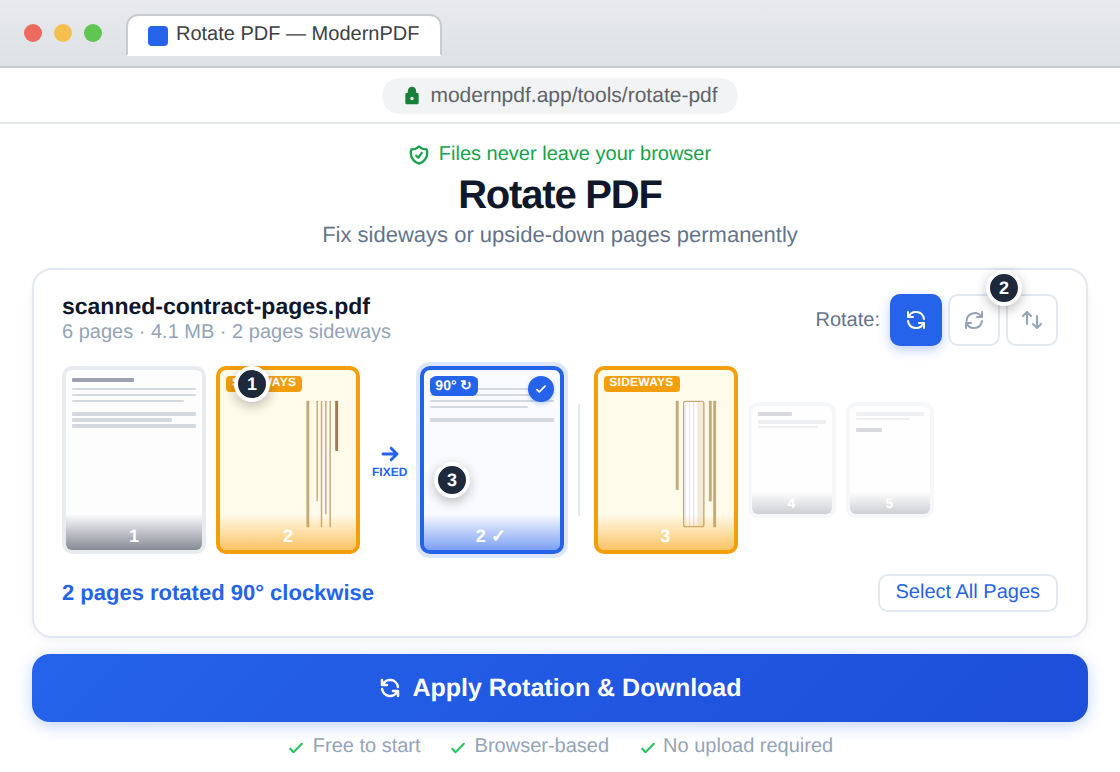
Click page thumbnails to select them — select individual pages or all at once. Choose 90° clockwise, 90° counter-clockwise, or 180° flip. You see the rotation applied in the preview before downloading.
Download your corrected PDF
Click apply and download the fixed document. The rotation is permanently saved — every PDF viewer, email client, and print queue will show the correct orientation.
Why Rotate a PDF?
Page orientation issues are one of the most common PDF problems, and they come from a few typical sources:
Scanned documents with wrong orientation. Flatbed scanners and phone scanning apps use auto-orientation detection that frequently fails. Landscape pages like checks, certificates, architectural drawings, and wide spreadsheets are especially prone to getting rotated incorrectly. Some scanners also struggle with low-contrast documents or pages with minimal text.
Mixed orientation in a single file. Many PDFs contain a mix of portrait and landscape pages — a report with embedded charts, a contract with landscape signature pages, or a presentation with slides in both orientations. Rather than printing and re-scanning, you can fix the orientation digitally in seconds.
Documents received from others. You receive a PDF from a colleague, client, or vendor, and some pages are upside down or sideways. You don't have the source file to re-export. Rotation fixes the viewing experience without touching the content.
Preparing for print. Before sending a document to a printer, all pages need consistent orientation. A single sideways page in a 50-page document wastes paper and confuses readers. Rotating before printing ensures every page comes out correctly.
Rotate vs. Rotate View: What's the Difference?
This distinction trips up a lot of people. Most PDF viewers (Adobe Reader, Chrome's built-in viewer, Mac Preview) offer a "rotate view" option that changes how the document looks on your screen — but only temporarily. Close the file, reopen it, or send it to someone else, and the pages are back to their original orientation.
A proper rotation tool changes the page orientation in the PDF file itself. The rotation is written into the document metadata, so it persists everywhere — in every viewer, every device, every email, and every print job. When you use ModernPDF to rotate pages, the change is permanent.
If you've been using the rotate button in Adobe Reader or Chrome and wondering why the pages keep reverting, that's the difference. You need an actual rotation tool, not just a view setting.
How to Rotate a PDF on Mac (Using Preview)
Every Mac includes Preview, which handles basic PDF rotation well. Here's how to use it:
Open your PDF in Preview — it's the default PDF viewer, so double-clicking the file usually works. In the sidebar, you'll see thumbnail previews of each page. If the sidebar isn't visible, go to View > Thumbnails.
To rotate a single page, click its thumbnail in the sidebar, then click the rotate button in the toolbar (or use Tools > Rotate Left / Rotate Right). Each click rotates the page 90°.
To rotate multiple pages at once, hold Command and click each thumbnail you want to select. Or to select all pages, press Command+A. Then click the rotate button and all selected pages rotate together.
Save with Command+S. The rotation is permanent once saved.
Preview works well for simple rotations. Its limitation is that it only offers 90° increments and doesn't handle batch processing or rotation rules (like "rotate all landscape pages to portrait"). For those tasks, ModernPDF's rotate tool is faster.
How to Rotate a PDF in Chrome
Chrome can rotate PDFs using the print dialog, though the process is indirect.
Open your PDF in Chrome (drag the file into a browser tab). Chrome's PDF viewer has a rotate button in the toolbar that rotates all pages — but this is a view-only change. To make it permanent:
Press Ctrl+P (Windows) or Cmd+P (Mac) to open the print dialog. Set Destination to "Save as PDF." Under Layout, choose Portrait or Landscape — this affects all pages uniformly. Click Save.
The Chrome method works in a pinch, but it has significant limitations. You can't rotate individual pages — it's all or nothing. And you can't mix orientations (some pages portrait, some landscape) in the output. For selective page rotation, use a dedicated tool.
How to Rotate a PDF Without Adobe Acrobat
Adobe Acrobat Pro lets you rotate pages through the Organize Pages panel, but it costs $22.99/month. For something as basic as rotating pages, you don't need it. Here's how the free alternatives compare:
| Method | Cost | File Privacy | Selective Pages | Permanent |
|---|---|---|---|---|
| ModernPDF | Free (3/day) | Never uploaded | Yes | Yes |
| Adobe Acrobat | $22.99/mo | Local (desktop) | Yes | Yes |
| Smallpdf | Free (limited) / $12/mo | Uploaded to server | Yes | Yes |
| iLovePDF | Free (limited) / $9/mo | Uploaded to server | Yes | Yes |
| Mac Preview | Free (built-in) | Local | Yes | Yes |
| Chrome Print | Free | Local | No | Yes |
The privacy distinction matters here just as much as with any other PDF tool. Smallpdf and iLovePDF upload your file to their servers for processing. ModernPDF processes everything locally in your browser — your document never leaves your device. For confidential documents, this is the safer approach. Read more about how our zero-upload architecture works.
Tips for Rotating PDFs
Preview before you save. Always verify the rotation looks correct on the page thumbnails before downloading. It's easy to accidentally rotate 90° clockwise when you meant counter-clockwise.
Rotate after scanning, not before printing. If you notice orientation issues after scanning a batch of documents, rotate the digital file rather than re-scanning. It's faster and avoids wear on the physical documents.
Check for mixed orientations. A document with mostly portrait pages and a few landscape charts might need selective rotation. Use the page thumbnail view to identify which specific pages need fixing rather than rotating the entire document.
Combine with other operations. After fixing orientation, you might want to split the document into sections, compress it for email, or merge it with other files. ModernPDF's tools work together — the output from one tool can be fed directly into another.
Frequently Asked Questions
Yes. ModernPDF shows thumbnails of every page. Click individual pages to select them, then apply rotation only to those pages. Unselected pages remain untouched. You can also select all pages at once if the entire document needs rotation.
Yes. The downloaded PDF has the rotation baked in permanently. It displays correctly in every PDF viewer — Adobe Reader, Chrome, Preview, Firefox, mobile apps — as well as in email clients and print queues. This is different from the "rotate view" option in most PDF readers, which only changes the display temporarily.
Scanners and phone scanning apps use auto-orientation detection that occasionally fails. Common triggers include landscape-oriented pages (checks, certificates, wide spreadsheets), low-contrast documents with minimal text, and mixed-orientation batches where the scanner loses track of which way is up. A quick rotation fix takes under 10 seconds.
No. Rotation is a lossless operation that changes the page display angle without recompressing or modifying the actual content. Text remains searchable and selectable, images stay at their original resolution, and vector graphics remain crisp. The file size stays essentially the same.
Use a browser-based tool like ModernPDF — open the rotate tool, drag in your file, click pages to select them, choose the rotation direction, and download. No software to install, no account required for free use. On Mac, you can also use Preview (Tools > Rotate Left/Right). In Chrome, the print-to-PDF trick works but only rotates all pages uniformly.
Rotate permanently changes the page orientation in the PDF file itself, so it persists everywhere. Rotate view only changes how the document appears in your current viewer session — close the file and reopen it, and the pages revert to their original orientation. If your rotated pages keep reverting, you're using rotate view instead of a proper rotation tool.
Yes. ModernPDF works on any device with a modern browser — iPhones, Android phones, and tablets. Tap page thumbnails to select them and choose the rotation direction. The same tool, same privacy, same result as on desktop.