Why Use AI for PDF Translation?
Traditional translation tools like Google Translate work well for simple phrases but struggle with longer documents. AI translation models like Claude Sonnet understand context, maintain consistency throughout a document, and produce more natural-sounding results.
In the WMT24 international machine translation competition, Claude Sonnet ranked #1 in 9 out of 11 language pairs — outperforming Google Translate, DeepL, and other established services.
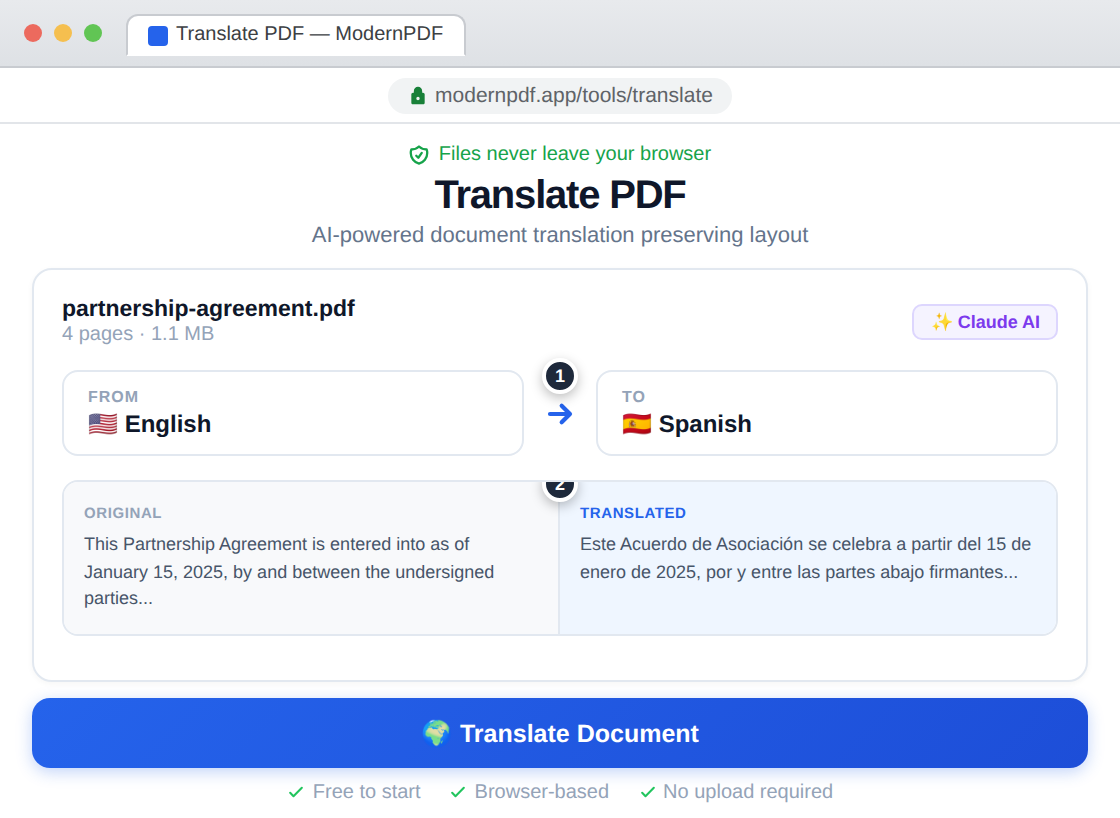
How to Translate a PDF with ModernPDF
ModernPDF's translation tool uses Claude Sonnet to deliver professional-quality translations while keeping your documents private.
- Go to ModernPDF Translate
- Upload your PDF (max 10 pages)
- Select the source language (or use auto-detect)
- Choose your target language
- Click "Translate"
- Download your translated PDF
Privacy note: Your PDF file stays in your browser. We extract the text, send only that text to the translation API, and rebuild the PDF locally. The original document never leaves your device.
What About Scanned PDFs?
If your PDF is a scanned document (images of text rather than actual text), you'll need to run OCR first:
- Use ModernPDF OCR to make your PDF searchable
- Download the searchable PDF
- Upload it to the translation tool
This two-step process ensures the translation has actual text to work with, rather than images.
Translation Quality: Claude vs Competitors
Not all translation engines are equal. Here's how they compare:
Claude Sonnet (What we use)
- Won WMT24 competition (9/11 language pairs)
- Excellent at maintaining document context
- Handles technical and specialized terminology well
- Produces natural-sounding output
DeepL
- Very good for European languages
- Requires 2-3x fewer human edits than Google
- Limited language selection compared to others
Google Translate
- Widest language support (100+ languages)
- Good for casual use
- Can struggle with context in longer documents
Tips for Better Translation Results
Check the source document
Translation quality depends on source text quality. Fix any typos or formatting issues in your original PDF before translating.
Use the right source language
Auto-detect usually works, but manually selecting the correct source language can improve accuracy, especially for similar languages.
Review specialized terms
AI translation handles technical terms well, but always review industry-specific terminology, proper nouns, and acronyms in the output.
Consider document length
ModernPDF supports up to 10 pages per translation. For longer documents, split them first using our PDF splitter.
Common Use Cases
- Business documents — Contracts, proposals, reports for international partners
- Legal documents — Translate supporting documents for immigration, legal proceedings
- Academic papers — Access research in other languages
- Personal documents — Translate forms, certificates, correspondence
- Technical manuals — Translate product documentation and guides
Frequently Asked Questions
What's the best way to translate a PDF?
The best way is using an AI-powered translator like ModernPDF, which uses Claude Sonnet — the #1 ranked translation model in the WMT24 competition, outperforming Google Translate and DeepL in most language pairs.
Can I translate a scanned PDF?
Scanned PDFs need OCR first to extract text. Use ModernPDF's OCR tool to make your PDF searchable, then translate the resulting document.
Is PDF translation private?
With ModernPDF, your PDF stays in your browser. Only the extracted text is sent for translation — the PDF file itself never leaves your device. This makes it safe for confidential documents.
How accurate is AI translation?
AI translation has improved dramatically. Claude Sonnet produces professional-quality translations that often require minimal editing. However, for legal or official purposes, always have a human translator review critical documents.
How many pages can I translate?
ModernPDF supports up to 10 pages per translation request. For longer documents, use our split tool to divide the document first.